
Entity SEO guide
What Is the Google Knowledge Graph and How Does It Affect SEO?
Google's Knowledge Graph is a database of entity facts that feeds knowledge panels and entity matching, shaping SEO without being a listed ranking system.

Short answer
The Google Knowledge Graph is Google's database of billions of facts about people, places and things, and it affects SEO indirectly. It tells Google which entity a search or a page refers to, and it supplies facts to knowledge panels and AI Mode. Google's ranking systems guide does not list it as a ranking system, so a Knowledge Graph entry brings recognition and branded visibility, not a documented ranking gain.
Google launched the Knowledge Graph on 16 May 2012 with more than 500 million objects and 3.5 billion facts, and it reported over 500 billion facts about five billion entities in 2020. Its facts come from public sources, licensed data, such as sports scores and stock prices, and content owners, and its systems create knowledge panels automatically when enough information exists on the open web.
The graph changes how results look more than how pages rank. It separates entities with the same name, such as Taj Mahal the monument and Taj Mahal the musician, and it fills knowledge panels on branded searches. Google also names it among the real-time sources behind AI Mode, while its structured data documentation says Google uses markup to gather information about the world, such as the people and companies a page describes.
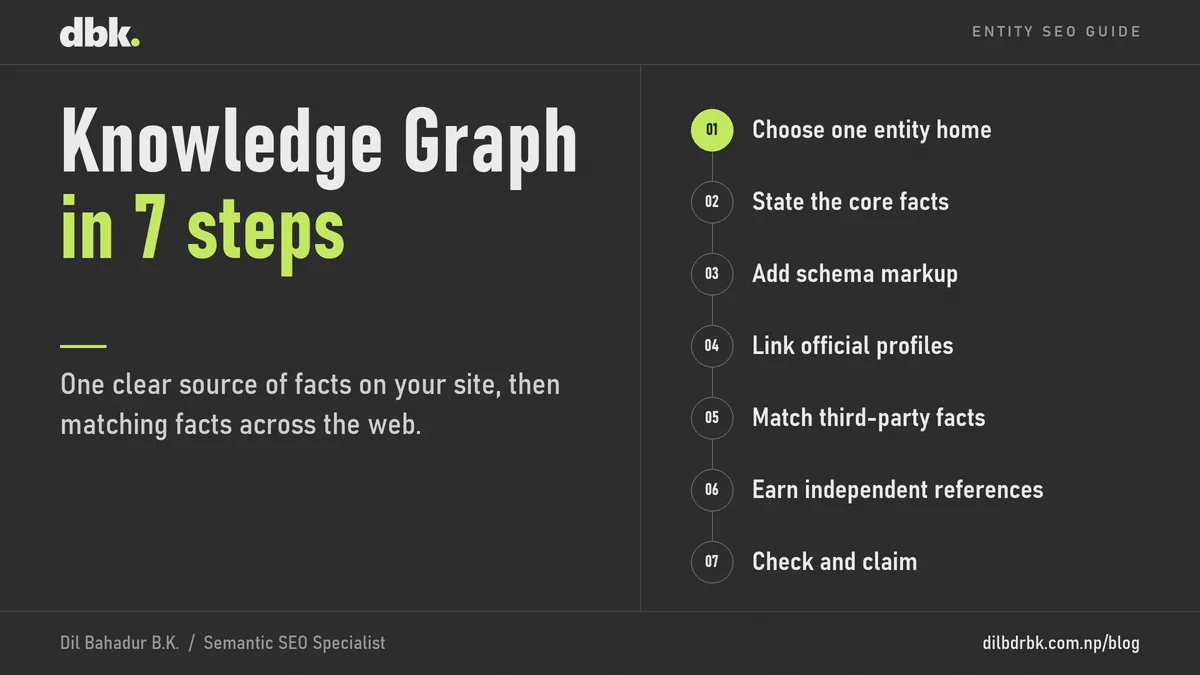
Google offers no form to add an entity, so a site earns an entry through 7 steps: one entity home page, clear facts, Organization or Person schema, sameAs links, matching profiles, third-party references and regular checks. The Knowledge Graph Search API and a search for the entity's name show the result, and a verified representative can claim the panel and suggest changes.
In this guide
What Is the Google Knowledge Graph?
The Google Knowledge Graph is a database of entities and the facts that connect them. Google's help center describes it as a database of billions of facts about people, places and things, and an entity is one identifiable thing, such as a person, a company or a mountain.
Google introduced the Knowledge Graph under the title "things, not strings". A string is the text a person types, and a thing is the real-world entity behind that text. Google's launch post uses Taj Mahal as the example: the same two words can mean a monument or a musician, and the graph lets Google separate the two.
Knowledge Graph vs Knowledge Panel vs Wikidata
The Knowledge Graph, a knowledge panel and Wikidata are often confused, but each does a different job. The table separates them, along with Google Business Profile.
| Name | What it is | Who controls it |
|---|---|---|
| Google Knowledge Graph | Google's private database of entities and facts | Google's automated systems |
| Knowledge panel | The information box that shows those facts in search results | Google, with suggestions from verified representatives |
| Wikidata | A public knowledge base that anyone can edit | Its volunteer community, under its own policies |
| Google Business Profile | A business listing for Search and Maps | The verified business |
A knowledge panel is the visible output, and the Knowledge Graph is the store behind it. An entity can sit in the Knowledge Graph with no knowledge panel at all, because Google's systems decide when a search should show one.
How Big Is the Google Knowledge Graph?
The Google Knowledge Graph held over 500 billion facts about five billion entities in 2020, the latest size Google has published. That is about 140 times the 3.5 billion facts Google reported at launch in 2012.
The Knowledge Graph in numbers
- 500M+ objects, 3.5B+ factsGoogle launches the Knowledge Graph from public sources such as Freebase and Wikipedia.
- 570M entities, 18B factsThe size Google reported seven months after launch.
- 1.6B candidate factsKnowledge Vault research extracts facts from web pages.
- 3B+ facts, almost 50M entitiesFreebase turns read-only, and its data moves to Wikidata.
- 500B facts, 5B entitiesThe latest size Google has published.
How Does the Google Knowledge Graph Work?
The Google Knowledge Graph works in 3 stages: it collects facts from many sources, connects those facts to entities, and uses them in search results. Google's systems run each stage automatically, and people report errors through feedback.
Where the Knowledge Graph Gets Its Facts
The Knowledge Graph draws its facts from 4 groups of sources, according to Google. The list shows each group.
- Public sources: Google named Freebase, Wikipedia and the CIA World Factbook at launch in 2012.
- The open web: Google states that it understands facts from materials shared across the web.
- Licensed data: Google licenses information that changes quickly, such as sports scores, stock prices and weather forecasts.
- Content owners: Google receives facts directly from the owners of content, such as through structured data on their pages.
Wikipedia matters, but it is not a requirement. Danny Sullivan of Google wrote in 2020 that Wikipedia is a commonly cited source and not the only one, and that Google draws from hundreds of sources across the web.
How the Knowledge Graph Connects Facts to Entities
The Knowledge Graph records facts about entities and the relationships between them, such as a company and its founder, as Google's launch post describes. The Knowledge Graph Search API shows part of this structure: each result carries an ID, such as kg:/m/0dl567, along with schema.org types, a description and a result score.
Research from Google shows how web pages can supply these facts. The 2014 Knowledge Vault paper by Dong and colleagues extracted about 1.6 billion candidate facts from the web, and about one third of its 271 million confident facts were new to Freebase. A research paper describes a method, not what Search runs today.
How Google Corrects Knowledge Graph Errors
Google corrects Knowledge Graph errors through public feedback and policy reviews. Anyone can select Feedback on a knowledge panel, and Google states that it studies these reports to learn how an error passed its systems and removes facts that are demonstrably false or outdated.
Google also accepts that errors happen. Its 2020 post says inaccuracies occasionally appear and that its systems are not perfect, which is why a site should check its entity facts regularly.
How Does the Knowledge Graph Affect SEO?
The Knowledge Graph affects SEO through recognition, not through a documented ranking signal. It changes which entity Google connects to a page or a search, what appears on branded searches, and which facts AI features can draw on.
Is the Knowledge Graph a Ranking Factor?
No, not according to Google's documentation. Google's guide to its ranking systems, updated 10 December 2025, mentions neither the Knowledge Graph nor entities, and it describes meaning-based systems, such as BERT and neural matching, instead.
Practitioners read the connection differently. Koray Tugberk Gubur of Holistic SEO argues that Google uses entity relations to judge a site's expertise on a topic, which is an interpretation and not a confirmed mechanism. The comparison of entity SEO and keyword SEO covers what Google confirms and what stays a hypothesis.
Knowledge Panels and Branded Searches
A knowledge panel gives an entity a large space in the results for its own name, with facts such as its logo, website and profiles. Google reported in 2012 that the facts it showed for Tom Cruise answered 37 percent of the next queries people asked about him, so a panel can satisfy follow-up questions on the results page.
Panels depend on the graph and on demand. Google states that panels appear when enough information exists on the open web, and Holistic SEO describes them as going to entities that are reliable and have enough search demand.
Entity Disambiguation for Pages and Searches
Entity disambiguation is the step that decides which real-world thing a name means, and it matters most for shared names. Google's Organization markup documentation states that this structured data can help Google understand an organization's details and disambiguate it in search results.
A business with a common name has the most to clear up. Clear facts, such as a location, a founder and official profiles, give Google the details it needs to keep that business apart from others with the same name.
AI Overviews, AI Mode and the Knowledge Graph
Google names the Knowledge Graph among the real-time sources behind AI Mode. Its March 2025 announcement says the feature combines web content with sources such as the Knowledge Graph, information about the real world and shopping data.
That statement does not prove that a Knowledge Graph entry earns citations, and Google has published no such link. Consistent entity facts still give AI systems less to misread, and the guide to getting cited by ChatGPT covers what each AI engine retrieves.
How to Get Into the Google Knowledge Graph in 7 Steps
Getting into the Google Knowledge Graph takes 7 steps, and none of them guarantees an entry. Google offers no submission form and states that it does not manually create or delete knowledge panels, so these steps make an entity easier for its systems to identify and confirm.
Step 1: Choose One Entity Home
Choose one page that defines the entity, usually the home page for a company and the About page for a person. Every other page and profile then points to this one source, so Google has a single reference for the entity's facts.
Step 2: State the Core Facts in Plain Text
State the facts that identify the entity in visible text, such as the full name, what it does, where it is based and who founded it. Use the same wording and spelling everywhere, because two versions of a name or founding year create doubt about the fact.
Step 3: Add Organization or Person Schema
Add Organization or Person schema to the entity home, with every value matching the visible text. Google states that it uses structured data to gather information about the world, such as the people and companies in the markup, and its guidelines state that markup does not guarantee a search feature.
Step 4: Link Official Profiles With sameAs
List the entity's official profiles in the sameAs property, such as LinkedIn, Crunchbase and GitHub. Google's Organization markup example includes sameAs, and the property ties the entity home to the same entity on other platforms. The Person schema on this site follows this pattern.
Step 5: Match Facts on Third-Party Profiles
Repeat the same facts on the profiles and directories you control, such as a Google Business Profile and industry listings. Holistic SEO notes that Google's algorithms keep using owned and unowned sources after an entity enters the Knowledge Graph, such as business profiles and Crunchbase, so an outdated profile keeps feeding it.
Step 6: Earn Independent References
Earn mentions on sites you do not control, such as news coverage, association pages and partner sites. Independent references give Google's systems a second source for each fact, and a Wikidata item is an option only when the entity meets its notability policy, which accepts items with a Wikimedia sitelink, serious public references or a structural need.
Step 7: Check and Claim the Result
Check for an entry with the methods in the next section, then claim any knowledge panel that appears. Repeat the check after each major change, because Google's systems decide over time when a search shows a panel.
Free tool
Knowledge Graph readiness checker
Pick an entity type and tick each signal you already have. The checker counts owned and third-party signals and lists the next gaps. It counts your preparation only: it is not a Google score, and no list guarantees an entry.
Entity typePerson
0 of 12 entity signals covered (0%) Owned 0 of 6, third-party 0 of 6.
Start with the owned signals: they sit on sources you control.
The lists are samples based on the steps in this guide. Google does not publish a checklist for entering the Knowledge Graph.
How to Check if an Entity Is in the Knowledge Graph
Three free checks show whether an entity has a Knowledge Graph entry, and each one answers a different question. The table compares them.
| Check | How it works | What it shows |
|---|---|---|
| Knowledge Graph Search API | Send the entity's name with a free API key | The ID, types, description and a result score for matching entities |
| Knowledge Graph ID URL | Open google.com/search?kgmid= followed by the ID, such as /m/0dl567 | The knowledge panel for that exact entity, a pattern Holistic SEO documents |
| Name search | Search for the entity's full name | Whether a panel appears and which facts it shows |
The API is free up to 100,000 read calls per day per project, according to Google. Google also warns that the API is not suitable for production-critical services and says it is moving it to Cloud Enterprise Knowledge Graph, so it suits spot checks. The API can return an entity even when a name search shows no panel, because an entry and a panel are separate things.
How to Claim and Correct a Knowledge Panel
To claim a knowledge panel, select the claim option at the bottom of the panel and sign in to one of the entity's official sites or profiles, such as YouTube, Search Console or Facebook. Google states that not every panel can be claimed yet.
Verified representatives can suggest changes, and Google reviews feedback from verified users within a few days. Some corrections are direct, such as links to social profiles, while subtitles cannot be requested and descriptions cannot be edited, because they come from data sources. A verified person can also ask Google to remove some personal details from a panel, such as a date of birth or a marital status.
Three roles share the access: owners and managers can suggest changes and manage users, and contributors can suggest changes. Fixing the source of a wrong fact matters as much as reporting it, because the panel and the Knowledge Graph draw on public information across the web.
Common Knowledge Graph Mistakes
Six mistakes keep an entity out of the Knowledge Graph or feed it wrong facts. The list explains each one.
- Inconsistent names: two spellings of one name, such as "J. Smith" and "John Smith", can read as two entities.
- Schema that the page does not show: markup with facts missing from the visible text breaks Google's structured data guidelines.
- Links to every profile: sameAs should list official profiles of the same entity, not unrelated pages.
- Forcing a Wikidata item: an entity that fails the notability policy can lose the item, along with the effort spent on it.
- Treating an entry as a ranking gain: Google documents no ranking benefit, so entity work belongs alongside content and links, not in place of them.
- Claiming and leaving: Google's systems keep updating the facts, so a claimed panel still needs regular checks.
Google Knowledge Graph FAQ
Is the Google Knowledge Graph free to use?
Yes. Knowledge Graph facts appear at no cost in Google Search, and the Knowledge Graph Search API gives each project up to 100,000 read calls per day at no charge. The API needs an API key.
Can I add my business to the Google Knowledge Graph?
Not directly. Google offers no submission form, and its systems add entities when they find enough consistent information. A clear entity home, schema markup and matching third-party profiles make a business easier to identify.
Do I need a Wikipedia page to get into the Knowledge Graph?
No. Danny Sullivan of Google wrote that Wikipedia is a commonly cited source and not the only one, and Google draws on hundreds of sources, such as licensed data and content owners.
How long does it take to get into the Knowledge Graph?
Google publishes no timeline. An entry depends on when its systems find enough consistent facts about the entity, so check with the Knowledge Graph Search API after each round of changes.
Does structured data guarantee a Knowledge Graph entry?
No. Google states that it uses structured data to gather information about the world, but its guidelines say markup does not guarantee a search feature, and nothing in its documentation promises an entry.
Are knowledge graphs still relevant for AI search?
Yes. Google named the Knowledge Graph among the real-time sources behind AI Mode in March 2025, and its 2020 figures of five billion entities show the scale of what those systems can draw on.
Get Your Entity Ready for the Knowledge Graph
Knowledge Graph work turns this guide into a plan for one person or business. I deliver 3 outputs in this kind of project:
- Entity audit: the facts Google shows today, and where they conflict across your site and profiles
- Entity map and schema: the entity home, core facts and Organization or Person markup with sameAs links
- Profile plan: the third-party profiles and references to correct or earn, in priority order
The work connects to a topical map, which plans the content around the entity, and it fits local service businesses, e-commerce stores and B2B companies.
References
Google documentation and statements:
- Amit Singhal, Google, Introducing the Knowledge Graph: things, not strings, 16 May 2012
- Danny Sullivan, Google, A reintroduction to our Knowledge Graph and knowledge panels, 20 May 2020
- Google Help, How Google's Knowledge Graph works
- Google Help, Submit feedback on content about you and Get verified on Google
- Google, Expanding AI Overviews and introducing AI Mode, 5 March 2025
- Google for Developers, Knowledge Graph Search API and Usage limits
- Google Search Central, A guide to Google Search ranking systems, updated 10 December 2025
- Google Search Central, Intro to how structured data markup works, updated 10 December 2025
- Google Search Central, Organization structured data, updated 8 September 2026
- Google Search Central, General structured data guidelines
Research papers:
- Xin Luna Dong and colleagues, Knowledge Vault: A Web-Scale Approach to Probabilistic Knowledge Fusion, KDD 2014
- Thomas Pellissier Tanon and colleagues, From Freebase to Wikidata: The Great Migration, WWW 2016
Practitioner sources and policies:
- Koray Tugberk Gubur, Holistic SEO, How to use Google Knowledge Graph API
- Koray Tugberk Gubur, Holistic SEO, Google's Knowledge Panel: How to Get, Manage and Optimize
- Wikidata, Notability policy