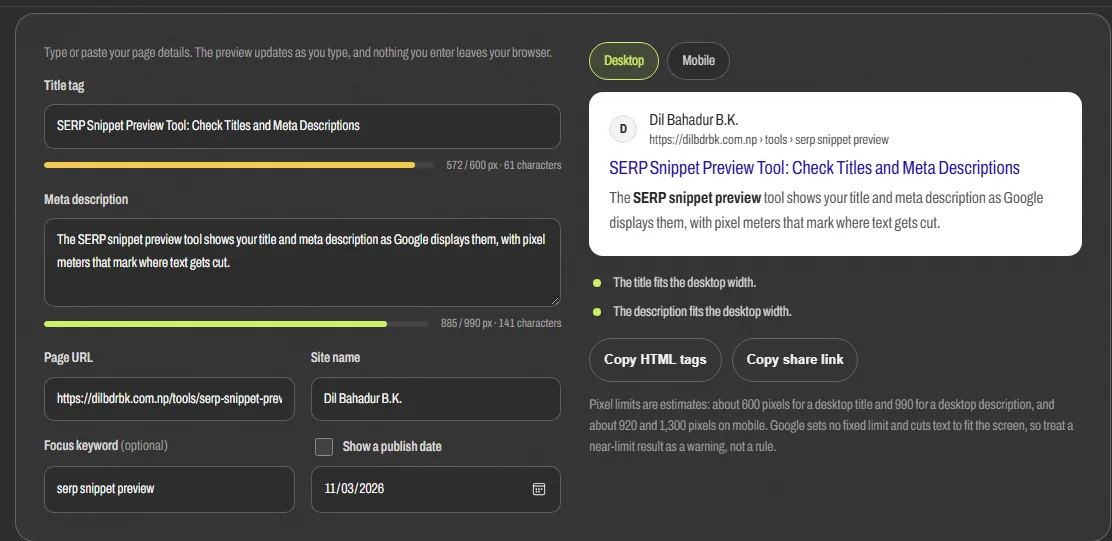
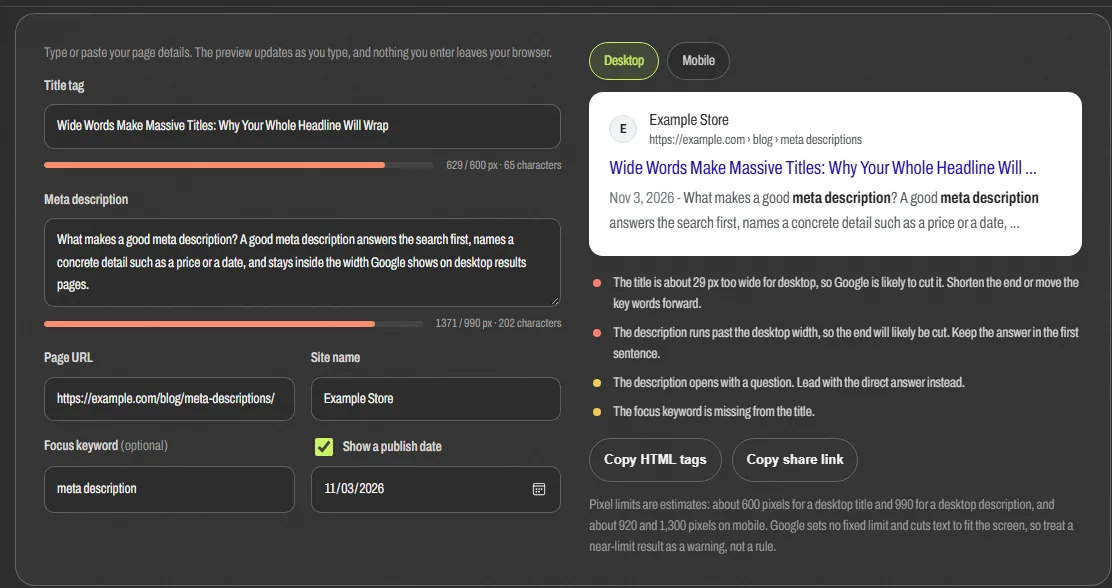
The SERP snippet preview tool shows how a title tag and meta description appear in Google results on desktop and mobile, measures both in pixels, and marks the point where Google is likely to cut the text.
Type or paste your page details. The preview updates as you type, and nothing you enter leaves your browser.
D
Turn on JavaScript to see the live preview and the pixel meters.
Pixel limits are estimates: about 600 pixels for a desktop title and 990 for a desktop description, and about 920 and 1,300 pixels on mobile. Google sets no fixed limit and cuts text to fit the screen, so treat a near-limit result as a warning, not a rule.
How to use the SERP snippet preview tool
The SERP snippet preview tool needs 4 inputs and returns a live Google-style result with a pixel check for each line. Follow the steps below for each page you publish or update.
Enter the title tag. Paste the exact text of the page's title element, and watch the title meter while you edit.
Enter the meta description. Paste the description and check that the answer to the page's main question comes first.
Add the URL and site name. The tool turns the URL into the breadcrumb Google shows, such as dilbdrbk.com.np › tools.
Add a focus keyword. The preview bolds the keyword in the description the way Google bolds matching search terms, and the tips confirm it appears in both lines.
Switch between desktop and mobile. Each device uses its own width, so a title that fits on mobile can still get cut on desktop.
Copy the tags. The copy button gives you the finished title and meta description as HTML, ready for your page or CMS.
Desktop preview: both meters stay within the estimated limits, so Google is likely to show the full title and description.Too long: the preview cuts the title and the description where Google is likely to, and the tips explain what to shorten.
How long should a title tag be?
A title tag should fit within about 600 pixels to show in full on desktop, which is roughly 50 to 60 characters of normal text. Google states that there is no limit on how long a title element can be, but that the title link is truncated as needed to fit the device width.
Pixels matter more than characters because letters differ in width. A title full of wide letters, such as W and M, gets cut sooner than a title of narrow letters, such as i and l, at the same character count.
Snippet line
Desktop estimate
Mobile estimate
Rough character count
Title
About 600 px
About 920 px
50 to 60 characters
Meta description
About 990 px
About 1,300 px
140 to 160 characters
The estimates come from the limits that common preview tools use. The tool measures every line in Arial, the font Google uses for results, while the preview card shows the text in this site's font. Google does not publish fixed numbers, so check important pages against a live search after publishing.
How long should a meta description be?
A meta description should fit within about 990 pixels on desktop, roughly 140 to 160 characters, so the full answer shows in results. Google states that there is no limit on how long a meta description can be, but that the snippet is truncated to fit the device width.
A visible date takes part of that space. When Google shows a publish date before the description, the date and its separator use pixels the description would otherwise fill, so the tool adds the date to the measurement when you switch it on.
Why does Google rewrite titles and meta descriptions?
Google rewrites a title or a description when it finds a better summary of the page elsewhere. Google states that snippets are primarily created from the page content itself, and that it uses the meta description when that gives a more accurate summary than the on-page text.
For title links, Google lists the sources it uses, such as the title element, the main visible heading, og:title tags, anchor text in links to the page and WebSite structured data. A title that matches the H1 and describes the page accurately is the one Google is most likely to keep.
How to write a title and meta description that earn clicks
A title and description earn clicks when they answer the search directly and specifically. The list covers 6 practices, drawn from Google's own guidance on snippets and title links.
Answer first in the description. Open with the direct answer to the page's question, not the question repeated.
Put the topic first in the title. Lead with the main topic, then add the qualifier, such as the year, the location or the brand.
Write a unique pair for every page. Google warns that repeated descriptions across pages are less useful in results.
Add concrete details. Google suggests details such as the price, the author, the date or key specifications.
Avoid keyword lists. Google states that descriptions made of long keyword strings explain little and are less likely to appear.
Keep the title and the H1 consistent. Matching wording makes it more likely that Google shows your title as written.
What should a SERP snippet preview tool check?
A SERP snippet preview tool should check pixel width, device differences and the content of each line, not only the character count. The table lists the checks this tool runs and why each one matters.
Check
Why it matters
Pixel width of each line
Google cuts text by display width, so a character count alone misjudges wide and narrow letters
Desktop and mobile views
Each device has its own width, so a snippet can fit on one and get cut on the other
Keyword bolding
Bold matching terms draw the eye, so the keyword should appear in both lines
URL breadcrumb and site name
Google shows the site name and a breadcrumb above the title, which frame the click
Publish date
A visible date uses part of the description's space
Answer-first description
A description that opens with the answer tells searchers the page solves their question
SERP snippet preview FAQ
Is the SERP snippet preview tool free?
Yes. The tool is free, needs no sign-up and runs entirely in your browser, so the titles and descriptions you enter are never sent to a server.
Does Google always show my title and meta description?
No. Google may rewrite either one when it finds a more accurate summary of the page, such as the main heading or text from the page itself.
Why does the preview cut my title before 60 characters?
The preview measures pixels, not characters. Wide letters and capital letters fill the roughly 600-pixel desktop width faster, so a title of 55 wide characters can still get cut.
Should every page have a meta description?
Yes. A unique description gives Google a summary it can show, and Google recommends page-specific descriptions instead of one shared text across pages.
Does a better snippet improve rankings?
A snippet does not raise rankings directly. A clear title and an answer-first description can raise the share of searchers who click, which is the traffic the ranking earns.
Related tools and guides
The free SEO tools page lists every standalone tool on this site, and the blog carries more interactive checkers inside its guides. The SEO audit checklist covers title tags and meta descriptions alongside 54 other checks.